7 Reasons TikTok Ads Fail Review & How to Get Them Approved Fast (2026)
Learn why your TikTok ads get rejected (policy violations, ad review failures) and discover actionable steps to fix errors and get your campaigns approved quickly.
Why Are Your TikTok Ads Being Rejected?
When running TikTok Ads, both automated systems and human review teams scan your video content, captions/text, audio, and Landing Page/Website. If any of these elements violate TikTok Advertising Policies, your campaign will immediately be marked as Rejected, or in worse cases, your ad account may be suspended
Top 7 Common Reasons TikTok Ads Fail Review & How to Fix Them
1. Exaggerated or Misleading Claims
TikTok is strict about promises that lack realistic backing or misinform users.
-
Common Mistakes:
-
-
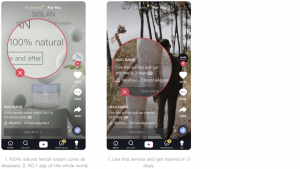
“Get married in 3 days using this app.”
-
“100% natural herbal cream cures all diseases.”
-
“NO.1 app in the whole world.”
-
-
-
How to Fix: Replace absolute claims with personal experience or verified survey results (e.g., “Helps support…” or “Rated highly by 85% of users…”).
2. Text, Caption, and Spelling Issues
Attempting to bypass filters using altered text or deliberate misspellings triggers automatic flags.
-
Common Mistakes:
-
-
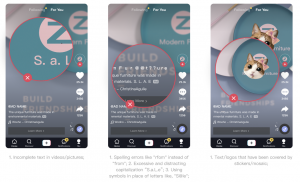
Typos or grammatical errors (e.g., “rfom” instead of “from”).
-
Distracting capitalization (e.g., “S.a.L.e”).
-
Using symbols instead of letters (e.g., “S@le”).
-
Text or logos covered by stickers, mosaic, or pixelation.
-
-
-
How to Fix: Review all text overlays and captions. Keep language clear, grammatically correct, and ensure no elements block on-screen text.
3. Low Video, Image, or Audio Quality
TikTok prioritizes user experience, so low-quality media is rejected right away.
-
Common Mistakes:
-
-
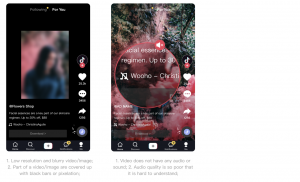
Low-resolution, blurry videos or images (< 720p).
-
Videos obscured by large black bars.
-
Videos without any audio or sound.
-
Muffled, unintelligible, or poor-quality voiceovers.
-
-
-
How to Fix: Export videos in vertical 9:16 format with high resolution (1080p recommended). Ensure audio tracks are clear and properly licensed.
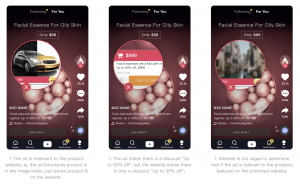
4. Inconsistency Between Ad Content and Landing Page
Discrepancies between what you promise in the ad and what appears on the sales page are major triggers for manual review rejections.
-
Common Mistakes:
-
-
Promoting a t-shirt in the video, but linking it to a shoe page.
-
Claiming “Up to 50% Off” in the ad, but showing “Up to 30% Off” on the website.
-
Vague landing pages that don’t clearly display the advertised product.
-
-
-
How to Fix: Align product details, prices, and promotional offers 100% between your ad creative and your destination page.
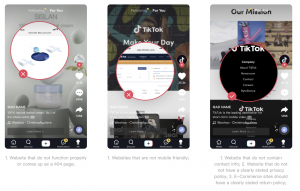
5. Non-Functional or Non-Compliant Landing Pages
TikTok thoroughly scans landing pages to protect users’ financial and personal safety.
-
Common Mistakes:
-
-
Broken links leading to 404 error pages or slow loading times.
-
Pages that are not mobile-friendly.
-
Missing business contact details (Email, Phone, Physical Address).
-
E-commerce sites lack a clear Privacy Policy or Return/Refund Policy.
-
-
-
How to Fix: verify links before submitting campaigns. Ensure the landing page loads smoothly on mobile devices and includes all mandatory footer legal policies.
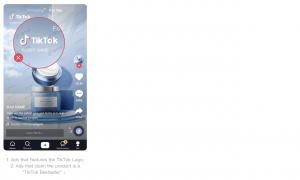
6. Copyright Infringement & Unauthorized Third-Party Logos
-
-
-
Unauthorized use of the TikTok logo in videos/images.
-
Claiming a product is a “TikTok Bestseller” without authorization.
-
Displaying third-party brand logos (e.g., Nike, Apple, Adidas) without proof of authorization.
Common Mistakes:
-
-
-
How to Fix: Remove all unauthorized third-party brand assets and TikTok branding from your creative materials unless you hold explicit permission.
7. Sexual or Shocking Content
TikTok strictly prohibits provocative or graphic content.
-
Common Mistakes:
-
Overly suggestive, provocative body shots, or revealing clothing.
-
Graphic images showing wounds, blood, or surgical procedures intended to shock viewers.
-
-
How to Fix: Frame product demonstrations tastefully. Focus on features and benefits rather than graphic or sensationalized visuals.
Quick Steps to Fix Rejected TikTok Ads
If your ad gets marked as Rejected, take these steps immediately:
-
Check the Rejection Reason: Navigate to TikTok Ads Manager > Campaign > Ad to read the specific failure code.
-
Edit & Resubmit: Make the necessary adjustments to your video or landing page. Pro-tip: Creating a new ad draft often routes through review faster than re-submitting an edited old ad.
-
Submit an Appeal: If you are confident your ad fully complies with all guidelines, click Appeal within the Ads Manager to request a manual review by the policy team.
Scale Your TikTok Ad Campaigns Smoothly with Gyxen
Frequent ad rejections harm your Account Health score, which can eventually lead to permanent account bans.
To maintain uninterrupted performance:
-
TikTok Agency Accounts by Gyxen: Gain access to high-trust agency accounts with faster review times and unlimited spending limits.
-
Dedicated Support: Get fast appeal assistance, policy troubleshooting, and landing page optimization guidance directly from our experts.
Get in touch with us to secure a reliable TikTok Agency Account & streamline your ad approvals!