TikTok Ads Guide: How to Track and Optimize Campaigns for Maximum ROAS
Setting up your TikTok campaigns and pixel is only half the battle. Once your ads go live, the real work of tracking, diagnosing, and optimizing begins.
If your ads aren’t performing as expected, don’t panic. Most delivery and performance issues can be traced back to a few common culprits. In this guide, we’ll show you how to troubleshoot slow spend, low conversion rates, and poor click-through rates (CTR) so you can scale your campaigns with confidence.
How to Troubleshoot “Don’t Spend” or “Slow Spend” Issues
It can be incredibly frustrating when you launch a campaign, only to find that TikTok isn’t spending your budget. Before making any major changes, follow these troubleshooting steps:
Step 1: Check Your Pixel Activity
First, you must ensure that your TikTok Pixel is active and communicating correctly with your website. You can verify this using two simple methods:
-
Method 1: Install TikTok Pixel Helper
-
Use the official TikTok Pixel Helper Extension (a Chrome browser extension) to inspect and debug your pixel installation directly on your live website.
-
Method 2: Test Your Pixel’s Events
-
Go directly to your TikTok Ads Manager and use the Test Events feature to trigger real-time test events on your site and confirm they are being recorded.
Step 2: Analyze and Adjust Your Delivery
If your pixel is fully functional but your budget still isn’t spent, check your impressions:
-
If impressions are low: Your targeting might be too narrow, or your bid is too low to compete in the auction. Try expanding your target audience, widening your interest/behavior parameters, and gradually increasing your daily budget to jumpstart delivery.
-
If impressions are high but spend is slow: TikTok is showing your ads, but the budget delivery is throttled. Consider broadening your optimization goal (e.g., moving from “Complete Payment” to a shallower event like “Add to Cart”) to help the algorithm collect enough data.
What to Do When Your Conversion Rate (CVR) Is Low
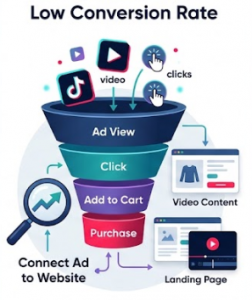
Are you getting plenty of clicks but very few actual purchases? A low Conversion Rate (CVR) usually points to a disconnect between your ad and your website.
-
Optimize Your Video Content: Check your metrics in TikTok Ads Manager by selecting Customize Columns. Look at where users are dropping off. If they click but don’t convert, make sure your landing page matches the exact offer and vibe of your video ad.
-
Evaluate Product & Market Fit: If your ad setup, targeting, and video views are excellent but conversions remain low, the issue might lie in the product itself. Analyze your competition, evaluate if your pricing is too high, or assess if the product is genuinely appealing to the specific country you are targeting.
How to Improve a Low Click-Through Rate (CTR)
A low Click-Through Rate (CTR) means your creativity is failing to grab attention in the fast-paced TikTok feed. If users are scrolling past your ad without clicking, it’s time to focus on your creative strategy.

-
Revamp Your Ad Creatives: Hook your audience in the first 2–3 seconds. Use high-impact visuals, trending sounds, and clear, compelling on-screen text.
-
Keep Tracking Down-Funnel Metrics: Once you successfully improve your CTR, closely monitor your next-step events (like Add to Cart and Initiate Checkout) to make sure those clicks are turning into high-quality traffic, avoiding the “low conversion rate” trap.
Summary
Successful TikTok optimization is all about reading the data and making systematic, incremental adjustments. Never make too many major changes at once, as this can throw your ad groups back into the learning phase.