TikTok Shop Ads: Grow sales with shoppable ads
What are TikTok Shop Ads?
TikTok Shop Ads are shoppable ad formats that let customers purchase products directly inside TikTok without leaving the app. TikTok Shop Ads send users to an external website or landing page, TikTok Shop Ads connect directly to your TikTok Shop Seller Center catalog.
Shoppers browse, tap, and buy in a single session, reducing the drop-off that typically happens when users leave a platform mid-purchase.
For eCommerce sellers, this short purchase path means fewer steps between product discovery and completed order.
| Feature | TikTok Shop Ads | TikTok Ads |
| Checkout | In-app | External |
| Goal | Sales (GMV) | Traffic, awareness |
| Product tagging | Yes | No |
| Catalog integration | Yes | Limited |
-
Core TikTok Shop Ad Formats (2026 Updates)
In 2026, TikTok streamlined its shopping ad ecosystem by consolidating Video Shopping Ads, Product Shopping Ads, and Live Shopping Ads into GMV Max.
2.1. TikTok GMV Max (The Default & Primary Engine)
GMV Max is the main campaign type for shop sellers. You set a daily budget and a Target ROAS. TikTok’s algorithm then evaluates your entire content pool (organic videos, affiliate posts, and product listings) and allocates budget toward the assets generating the highest conversion signals.
-
Product GMV Max: Drives traffic and direct purchases to your product catalog listings.
-
LIVE GMV Max: Directs viewers to active live shopping sessions, ideal for real-time product demonstrations and flash promotions.
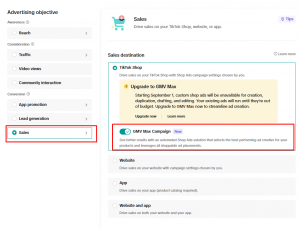
2.2. TikTok Search Ads
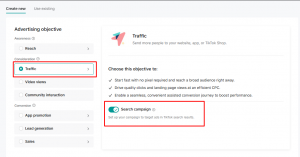
Search Ads place your products directly in front of users actively searching for specific keywords on TikTok. This format intercepts buyers during the mid-consideration phase when intent is high. It supports driving traffic to TikTok Shop listings, Shopify stores, or external sites.
2.3. TikTok Promote
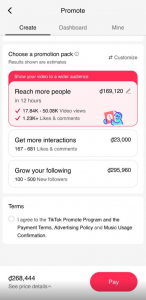
Promote offers an easy, lightweight entry point directly inside the app with small daily budgets (starting at $3–$5/day). While useful for testing organic video traction or building early follower growth, Promote does not sync with your product catalog and is not built for deep GMV optimization.
-
The 6-Step TikTok Shop Campaign Setup Workflow
-
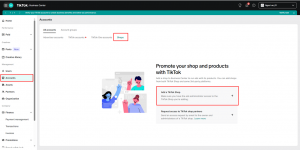
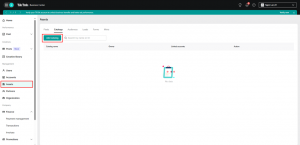
Link Accounts: In Business Center, connect your TikTok Shop account under Account → Shops, or connect your E-commerce shop under Assets – Add Catalog
-
Select Campaign Objective: Create a new campaign and select Product Sales to train the algorithm toward purchase conversions.
-
Choose High-Potential Products: Focus on hero items that already show strong organic signals (saves, page views, or organic orders).
-
Produce Native Creatives:
-
Vertical 9:16 aspect ratio.
-
Showcase the product or visual hook within the first 2–3 seconds.
-
Keep video length between 24 and 60 seconds.
-
Attach product anchor links to enable the orange shopping cart.
-
-
Test Multiple Variations: Run 3–5 video variations per product (changing the hook, angle, or audio) to identify the creative with the lowest Cost per Purchase (CPP).
-
Scale with GMV Max: Once winning creatives emerge, activate GMV Max to scale reach. Increase budgets by 30% incrementally as long as ROAS remains stable.
-
Key Tips for High-Converting TikTok Ad Creatives
-
The 3-Second Rule: Viewers decide to stay or scroll within seconds. Place the core value proposition, product, or emotional hook immediately upfront.
-
Embrace Native Aesthetic (UGC): Ads that look like polished commercials often get skipped. Authentic, handheld footage filmed in natural lighting achieves higher watch time and engagement.
-
Show Real-Life Product Usage: Swap out flat 2D mockups for real unboxings, try-ons, and authentic reactions to give buyers visual proof before purchase.
-
Drive Urgency & Social Proof: Highlight limited-time discounts, low stock alerts, or genuine customer reviews to encourage immediate session conversions.
-
Core Metrics Every Marketer Should Track
To evaluate actual business performance, monitor these 5 primary metrics:
-
Product Clicks: Measures interest in tapping the product card. High view count with low product clicks signals a weak call-to-action (CTA) or hook.
-
Conversion Rate (CVR): The percentage of product page visitors who complete an order. Low CVR points to issues with pricing, product descriptions, or listing photos.
-
Cost per Purchase (CPP): Total ad spend divided by completed purchases. Compare CPP against product margins to ensure profitability.
-
GMV (Gross Merchandise Value): Total sales revenue generated across the store.
-
ROAS (Return on Ad Spend): Revenue generated per dollar spent on ads. Account for product cost of goods (COGS), platform fees, and shipping before setting your target ROAS.